Data Native Agents
TL;DR
- Search agents are built to be good at the web.
- Not every question can be answered from the open web. Much of the most valuable data sits behind paywalls and licensed databases.
- Most search agents treat data as an add-on, bolted onto their existing agent product.
- Tako's agents operate directly on data, making them faster, more flexible, and cheaper.
- GTM list building is a good example of why Knowledge Graphs outperform Data Connectors.
Why data native
Typical search agents are strong at exactly what they are designed to do: search the web. To them, data is usually an afterthought: something added after the fact for specific use cases where the web just doesn't cut it. And this works, mostly. Models today are smart, and armed with enough tools, they often figure out how to get the job done.
However, a bolted-on experience inherently comes with compromises. Agents that don't treat data as a first-class citizen end up slower, more expensive, and lower quality on tasks that require data. The extra layer between the agent and its data limits the agent's flexibility, adds friction and increases complexity.
Tako's agent works the other way around. It's data native: it starts from structured company and people data, the kind that sits behind those paywalls, and reads the web only to fill the gaps. Its data comes straight from high-quality providers, so building a complete list is far easier than collecting results from dozens of web sources, enriching each one through a data connector, and assembling them into one dataset.
That difference shows up in everything we measured: how many people come back, how long it takes, and what each contact costs. We tested it on one task where the answer is data, not a page: building lead lists. Here's the short version.
Case study: Building GTM lead lists
A sales rep doesn't want a blog post or a careers page. They want data: lists of people at target companies, paired with key information like job title, LinkedIn URL and contact info, all in a simple format that is easy to load into a CRM.
That makes lead lists a hard test for a web agent. The answer is a dataset: dozens of people, with the most valuable data, like emails and phone numbers, mostly sitting in licensed databases. To see how much that matters, we gave the same 39 prospecting questions1 to three agents: Exa's web agent, with and without its Fiber data connector; Parallel's FindAll, with and without enrichment enabled; and Tako's company research agent at both low and medium effort. First we describe how each one works. Then we compare them on what a rep cares about: how many people come back, how many come with a LinkedIn URL and an email or phone, how long it takes, and what each contact costs.
How each agent works
Exa's agent is fairly fast and cheap, and strongest on well-known people, who have the most coverage on the web. It supports structured outputs, but on its own it typically fails to find emails or phone numbers. Turn on its Fiber data connector and it can look them up, one tool call per person, which makes each run slower and more expensive.
Parallel's FindAll is built to find every entity that matches a description. You describe what you want, it turns that into match conditions, and it runs with or without an enrichment step. Turn on its enrichment and it looks up each match's email and phone during the same run, for an extra fee per match. We ran it both ways, on the Base tier for both the main run and the enrichment step. It's thorough, but a run takes 4–17 minutes and costs $0.30–$4.25, and its contacts are scraped from public directories rather than verified. Higher tiers do return more results, but costs climb quickly with each tier, which made evaluating them very expensive.
Tako's company research agent starts from structured company and people data and returns a table. Contacts come back as locked columns on the rows, which you can optionally unlock for an additional fee. That lets you do the hard work of defining and retrieving a list of people cheaply, then decide whether the list is good before you pay for the expensive contact data. The Tako agent runs at two effort levels:
- Low effort builds lists from a fixed set of filters: a person's role, department and seniority, their country, and company traits like industry and size. Each filter maps straight onto an index, which is what makes low fast. But it can only ask what those filters express. It can't match a specific job title or a niche kind of employer, so its lists are looser and sometimes empty.
- Medium effort writes its own queries over the same data, so it can combine conditions the filters don't cover, like a “chief information security officer” title at employers tagged as hospitals. It's slower than low, but more precise.
Side by side, here's what you can do with the results:
Quality
Answer quality is hard to check for premium data, which often isn't on the open web. Rather than score each of the hundreds of people an agent can return for one question, we measured:
- How many people the agent returns
- How many of them come with the fields a sales rep needs: a LinkedIn URL and contact info (phone number or email)
- How that coverage varies across kinds of question
Here's what we found:
- Exa finds LinkedIn URLs, mostly for well-known people. At medium effort it returned them for 22% of people without the Fiber data connector and 44% with it, most of them on the named-company questions. At low effort it returned fewer people, 23 a run against 36, and LinkedIn URLs for 18% of them.
- Without the Fiber data connector, Exa returned no contact information. With Fiber at medium effort, 38% of people came back with an email or phone. At low effort that share rose to 72%, but the lists shrank to 8 people a run, so Exa returned fewer contacts: 6 a run against 9.
- Tako returned the most people, and contacts for 49% of them (47% at low effort). Tako averaged 66 people a run at medium effort and 83 at low, against 24 for Exa with Fiber at medium effort and 8 at low. It returned LinkedIn URLs for 66% of them (70% at low effort).
- Parallel's coverage comes from its enrichment step. With enrichment, it returned LinkedIn URLs for 88% of people and an email or phone for 43%, a higher share than Exa with Fiber (44% and 38%). Without it, FindAll returned about as many people, 38 a run against 372, but no LinkedIn URLs or contacts.
Latency
- Without contacts, Exa is fairly fast: a median of 90 seconds at medium effort, and 29 at low. Tako medium took 53 seconds, and Tako low 20.
- Asking for contacts changes that. Exa with Fiber took a median of 504 seconds at medium effort, more than 5× as long, and 139 seconds at low effort, nearly 5× as long. Parallel's enrichment runs during its search, so it added less: 41 seconds to a 493-second median. Unlocking Tako's contacts took just 0.3 seconds.
- One question: “Which CISOs lead security at American hospitals and health systems?” Exa with Fiber took 9 minutes, and Parallel 16. Tako took 64 seconds, plus 0.3 seconds for the contacts.
Cost
- Exa without Fiber is cheap: a flat $0.10 a run at medium effort and $0.025 at low, but no contacts.
- With Fiber, Exa cost $2.03 a run at medium effort, about $0.23 per contact. At low effort a run cost less, $1.41, but returned fewer contacts, so each cost about $0.25.
- Tako cost about $0.05 per contact at either effort, under a quarter of Exa's price. Unlike with other agents, you pay for each row you export, and you choose how many rows to pull.
- Parallel cost about $2.03 a run with contacts, $1.58 without, and about $0.13 per contact. We computed that from Parallel's published rates, because FindAll doesn't report cost.
Deep dive
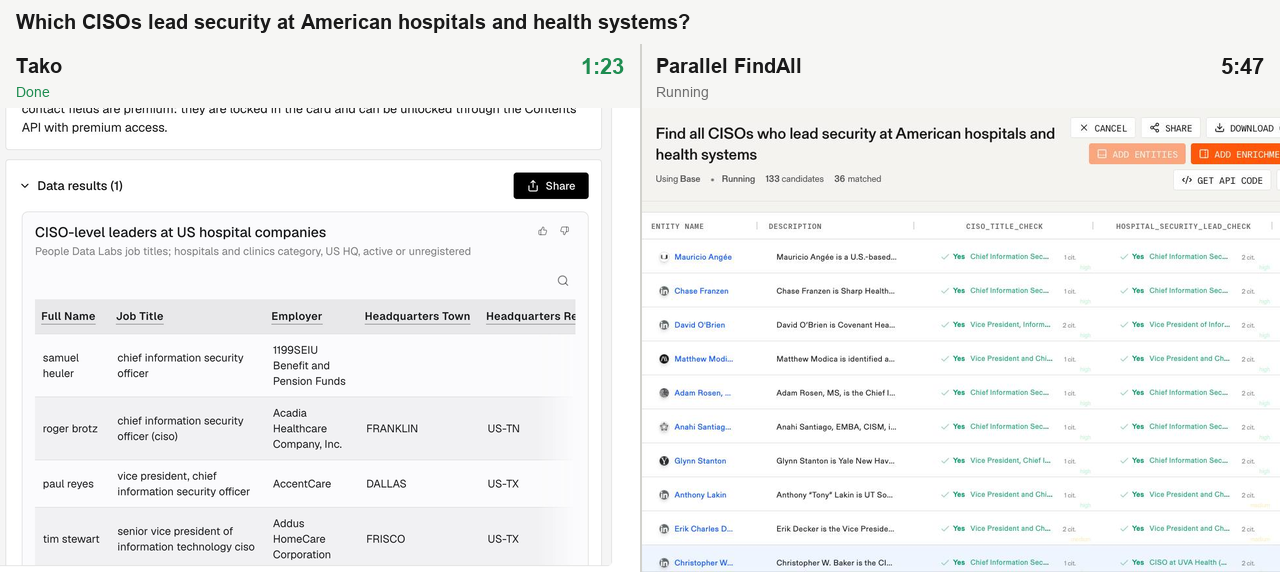
We ran the same CISO question in each agent's playground and recorded them side by side.
- Tako finishes in 1 minute 23 seconds with a table you can share: 438 CISOs with their LinkedIn profiles, and a work email ready to unlock for 259 of them.
- Exa with Fiber finishes after 5 minutes 38 seconds: 8 people, all with an email and phone, for $2.90.
- Parallel finishes after 10 minutes 10 seconds: 77 people, 76 with LinkedIn and up to 45 with an email or phone.
Recorded runs vary. In the benchmark runs above, the same question took Tako 64 seconds, Exa with Fiber 9 minutes and Parallel 16 minutes.
Recorded from each agent's playground. Sped up 8× until the Tako pane finishes, then 41×.
Try it
Ask Tako's company research agent for a list in its playground, like “Show me the executive officers at Delta, United, American and Southwest.”
Methodology
- Questions. 39 prospecting questions of three kinds: role-at-segment lists (“CISOs at American hospitals”), named-company leadership, and registry lists. Every agent ran all 39. Footnote 1 lists a sample.
- Agents. Exa's agent at medium effort ($0.10 a run) and low effort ($0.025 a run), each with and without its Fiber connector. Exa's playground defaults to Auto. Parallel's FindAll (Base generator), once with Base enrichment on every match and once without. Tako's company research agent at medium and low effort. Same question text, no follow-ups. Two runs per question for Tako, one for each Exa and Parallel configuration to limit cost.
- People and contacts. We counted the people each agent returned, from the list it exported. A person counts as having a contact when the row has a work email, personal email or phone number. Tako exports were capped at 100 rows per list, so Tako's counts are a floor.
- Latency. Wall-clock time from request to final answer. For Tako with contacts, we add the time of the /contents call that reveals them, measured separately on the same lists.
- Cost. What each provider billed for the run: Exa's run fee plus Fiber calls; Tako's agent charge plus the data charge for the exported rows, contacts included, at list prices. Parallel's cost is computed from its published rates, because FindAll doesn't report one.
- What we didn't measure. We didn't score whether each person was correct or each email deliverable. Neither can be checked reliably from the open web for premium data.
Footnotes
- 1 A sample of the 39 questions:
Who are the CROs at mid-sized American B2B SaaS companies, roughly 200 to 1,000 employees?
I'm looking for COOs at UK fintechs.
Find me CTOs at German software companies with 50 to 1,000 staff.
Which CISOs lead security at American hospitals and health systems?
Who sits on the boards of publicly traded US banks?
Who's the general counsel at each publicly traded biopharma company in New Jersey?
Who's the top lawyer at each of the big UK banks: HSBC, Barclays, Lloyds, NatWest and Standard Chartered? - 2 On 7 of the 39 questions, Parallel FindAll returned the companies (or, for one question, the football clubs) rather than the people, naming the executive or owner beside each, so those count as 0 people.
† Tako (low effort) builds lists from a fixed set of filters, which can't match a specific job title or a niche kind of employer. On some questions that makes its lists larger but less precise.
Ground your AI agents in real-time, structured data — web and premium sources unified in one API. Try Tako in the Playground or .